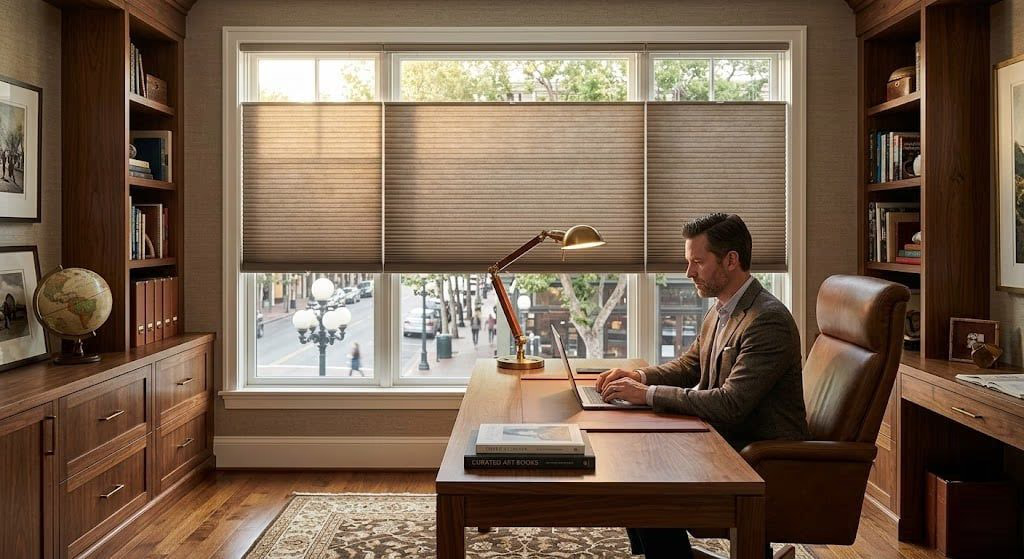
Home Office Window Treatments - Glare Reduction and Productivity
Designer Screen Shades with 3% to 10% openness reduce monitor glare by 90% to 97% while maintaining a clear view of your Sonoma County landscape. They diffuse incoming light evenly across the room, eliminating the harsh brightness contrast between your screen and the window that causes eye strain during long work sessions. Discount Best Blinds and Shutters installs glare-reducing screen shades throughout Windsor, Healdsburg, and Sonoma County.
Why Is Glare Reduction Critical in a Home Office?
Monitor glare from uncontrolled window light reduces readability, forces you to increase screen brightness to compensate, and causes eye fatigue that compounds over an 8-hour workday. Proper screen shading eliminates glare without darkening the room or blocking your view.
In Sonoma County, home office windows often face west or south, receiving intense direct sunlight for several hours each afternoon. Without treatment, this creates a brightness differential between the window and your monitor that exceeds your eyes’ comfortable adaptation range. Your pupils contract in response to the bright window, making the monitor appear darker, so you increase brightness, which in turn increases overall eye fatigue. Designer Screen Shades break this cycle by filtering incoming light to a level that matches your monitor output. At 3% openness, the shade reduces visible light transmission to approximately 3% while blocking 97% of UV radiation that damages furniture and flooring. You maintain a clear view of the outdoors in a comfortable, evenly lit workspace.
How Do You Choose the Right Openness Factor for Your Office?
The openness factor determines how much light passes through the screen fabric. Lower openness means more glare reduction but less view clarity. Most home offices perform best with 3% to 5% openness, which blocks 95% to 97% of glare while preserving a usable view.
Your ideal openness depends on three factors: window orientation, monitor position, and view priority. A west-facing window with a monitor directly opposite needs maximum glare control - 1% to 3% openness. A north-facing window with the monitor perpendicular can use 5% to 10% openness for a clearer view with minimal glare risk. If preserving your wine country view is a priority, 5% openness offers the best compromise. During your free consultation, Phil D. Skikos evaluates your desk layout, window orientation, and monitor position to recommend the precise openness factor that optimizes both productivity and view quality. Screen shades are available in over 370 fabrics through the Designer Roller and Solar Shades collection.
How Do Screen Shades Improve Video Call Quality?
Screen shades diffuse incoming light into even, soft illumination that webcams can balance properly. This eliminates the backlighting and harsh shadows that make you appear silhouetted or unevenly lit during video calls.
When a bright window sits behind you during a video call, the camera exposes for the brightest element in the frame - the window - and your face goes dark. Screen shades at 3% to 5% openness reduce the window brightness to a level the camera can balance alongside your face. With PowerView Gen 3 motorization, you can set a one-tap scene that lowers shades to your preferred video call position before every meeting. This consistent lighting setup means you look professional on every call without manually adjusting anything. Voice commands through Apple HomeKit, Amazon Alexa, or Google Assistant make it even easier: “Hey Siri, set office for video call.”
Designer’s Note
Screen Glare Science and Remote Work Ergonomics in Sonoma County
Designer Roller Shades with 3% openness fabric reduce screen glare by 86% while maintaining 97% UV block and visual connection to the outdoors, making them the ergonomic standard for Sonoma County home offices where remote professionals work facing vineyard and hillside views.
Screen glare is the primary ergonomic complaint in home office environments, and its impact compounds over an 8-hour workday. When uncontrolled window light exceeds 3 times the luminance of your monitor, your pupils constrict in response to the brighter source, reducing perceived monitor contrast and forcing compensatory screen brightness increases that accelerate eye fatigue. The specific openness percentage of a screen shade directly controls visible light transmission: 1% openness transmits approximately 1% of daylight (near-blackout conditions), 3% openness transmits approximately 3% (the sweet spot for most offices), 5% provides slightly more ambient light with a clearer view, and 10% approaches the feel of tinted glass. Home offices in Windsor and Healdsburg increasingly feature dual-monitor setups where precise light control is essential - a bright reflection on one screen forces the user to reposition or squint, disrupting workflow. Motorized screen shades with PowerView Gen 3 allow remote workers to create “focus mode” scenes that automatically lower shades to 3% during work hours and raise them during breaks for full view enjoyment.
Screen Shade Openness Factor Comparison
| Feature | Value | Notes |
|---|---|---|
| Openness Factor | 1% | Maximum glare block, minimal view |
| UV Block | 99% | Near-complete UV elimination |
| Visible Light Transmission | ~1% | Very dim ambient light |
| Glare Reduction | 99% | Best for direct sun on monitor |
| Openness Factor | 3% | Optimal for most home offices |
| UV Block | 97% | Excellent UV protection |
| Visible Light Transmission | ~3% | Comfortable ambient for screens |
| Glare Reduction | 97% | Ideal monitor glare balance |
| Openness Factor | 5% | Better view, moderate glare control |
| UV Block | 95% | Strong UV protection |
| Visible Light Transmission | ~5% | More natural daylight feel |
| Glare Reduction | 95% | Good for indirect light offices |
| Openness Factor | 10% | Maximum view, least glare control |
| UV Block | 90% | Moderate UV protection |
| Visible Light Transmission | ~10% | Bright ambient, tinted glass feel |
| Glare Reduction | 90% | Best for north-facing offices |
Do Home Office Screen Shades Provide Energy Savings?
Screen shades reduce solar heat gain by 60% to 90% depending on openness factor, lowering air conditioning demand during Sonoma County’s hot summer afternoons. A 3% openness shade blocks approximately 97% of incoming solar energy at the window.
Home offices occupied during peak afternoon heat benefit significantly from solar control. Without shading, a west-facing office window can raise room temperature by 5 to 10 degrees above the rest of the house, forcing the HVAC system to work harder. Screen shades intercept that solar energy at the glass, keeping the room comfortable without increasing cooling costs. For maximum thermal performance in an office where view preservation is secondary, consider layering screen shades with cellular honeycomb shades that achieve R-values up to 7.0 and U-factors of 0.23, exceeding the 2026 Title 24 U-factor ≤ 0.27 requirement. Paired with automated scheduling, shades adjust throughout the workday to track sun position and maintain optimal thermal and visual comfort.
Home Office Window Treatment Questions Answered
What openness factor is best for reducing monitor glare in a home office?
A 3% to 5% openness factor provides the optimal balance between glare reduction and outward visibility for most home offices. Three percent openness blocks 97% of glare-causing direct light while still allowing you to see the landscape outside during daylight hours. Five percent openness admits slightly more ambient light and provides a clearer view, but may allow some glare on monitors positioned directly opposite a window. For home offices with monitors facing a bright west-facing window, 3% openness is recommended. For rooms with indirect light or monitors perpendicular to windows, 5% openness preserves more of the view.
How do window treatments improve video call lighting?
Proper window treatments eliminate two common video call problems: backlighting that silhouettes your face and harsh side lighting that creates uneven shadows. Screen shades with 3% to 5% openness diffuse incoming light evenly across the room, providing soft ambient illumination without the harsh contrasts that webcams struggle to balance. Position your desk so the window is behind or beside your camera, not behind you. If the window is behind you, a lower openness factor like 1% to 3% prevents the webcam from blowing out the background. Discount Best Blinds and Shutters evaluates your desk position and window orientation during the consultation to recommend the ideal openness.
Can screen shades reduce eye strain during long work sessions?
Yes. Eye strain during extended computer use is exacerbated by brightness contrast between your monitor and the surrounding environment. When a bright window creates a high-contrast background behind or beside your screen, your pupils constantly adjust between the monitor brightness and the ambient glare, causing fatigue and discomfort. Screen shades reduce the brightness differential by filtering incoming light to a level closer to your monitor output, creating a more uniform visual field. A 3% openness screen shade reduces visible light transmission to approximately 3% of full daylight, bringing ambient levels in line with standard monitor brightness for comfortable all-day work.
Do home office screen shades still allow a view of the outdoors?
Yes. Screen shades are specifically designed to reduce glare while maintaining outward visibility. At 3% openness, you can clearly see landscape features like trees, buildings, and sky during daylight hours, though the view is softened and slightly muted compared to bare glass. At 5% openness, the view is crisper with more color saturation. At 10% openness, the view approaches that of tinted glass. The trade-off is that higher openness admits more glare. For Sonoma County home offices with vineyard or hillside views, 5% openness typically offers the best compromise between view quality and glare control.
Related Products and Solutions
Optimize Your Home Office for Productivity
Book a free consultation and Phil will assess your desk layout, monitor position, and window orientation to recommend the ideal screen shade openness factor. We serve Windsor, Healdsburg, Santa Rosa, and all of Sonoma County.